
I’m a self‑driven, results‑focused professional with a broad skill set and a proven history of delivering meaningful impact. I don’t just provide solutions; I actively pursue them. When I don’t have an answer or direction, I research, test, and uncover it. My priority is helping organizations grow, perform, and succeed through competence, adaptability, and strategic execution.
Engineering, Technical Experience & Services
Phone: 661-365-5792

-
Product R&D and Product Management, Design for Manufacturing (DFM) across Consumer Electronics, Pro/Commercial environments for Audio‑Video, Security, Home Automation, LED Lighting, AC/DC Power, Wired/Wireless Networking, and IP/PoE systems. Experienced in taking hardware and software designs from proof‑of‑concept through full product launch.
-
Value‑Added Product Solutions Engineer with deep expertise in creating innovative, market‑ready solutions.
-
Electronic Engineering, Technical CAD drawings, and Consulting for product development, system architecture, and engineering documentation control/management.
-
Residential and Pro Audio/Commercial AV, Lighting, Security and Automation System Integration, including technical design, system layout, and implementation strategies for new construction projects and retrofits.
-
Creation and design of product catalogs, brochures, technical literature, instruction manuals with detailed product information/ technical specifications, packaging, website technical information/diagrams, and application notes.
-
UI/UX Design for intuitive, user‑focused interfaces across hardware and software platforms.
-
Development of technical training materials and support documentation for sales teams, trade shows, and partner education.
-
Creation of technical concepts, imagery, and presentations for customer engagement, email campaigns, LinkedIn content, training, and marketing initiatives.
-
Marketing support through technical resources, product insights, and strategic guidance to strengthen brand awareness and identify key markets and customer segments.
-
Extensive familiarity with industry leaders in AV and home automation products, systems, and technologies.
Please Note! This website is constantly in flux and a work in progress and is being updated, modified on a reqular basis.
Access Control Security
Access control security is the system of policies, hardware, and software that determines who can enter a space, when they can enter, and what they are allowed to do once inside. It’s the backbone of physical and digital security—controlling doors, gates, networks, and sensitive resources.
Where Access Control Is Used
-
Commercial buildings
-
Schools and campuses
-
Hospitals
-
Industrial sites
-
Data centers
-
Residential communities
-
Government and military facilities
Where Access Control Technology and Hardware Is used
-
Commercial buildings
-
Schools and campuses
-
Hospitals
-
Industrial sites
-
Data centers
-
Residential communities
-
Government and military facilities
The Four Pillars of Access Control Security
1. Identification
The system needs to know who is requesting access. Examples:
-
Badge ID
-
Username
-
Mobile credential
-
License plate (LPR)
-
Biometric signature
2. Authentication
Verifies the identity is real. Examples:
-
PIN code
-
Card swipe
-
Fingerprint/face scan
-
MFA (card + PIN, mobile + biometric)
3. Authorization
Determines what the person is allowed to access. Examples:
-
“Employee can enter office 8 AM–6 PM”
-
“IT staff can access server room”
-
“Contractor only allowed on weekdays”
4. Audit / Logging
Tracks every access event for security and compliance. Examples:
-
Door forced open
-
Invalid PIN attempts
-
After-hours access
-
Tailgating alerts (with cameras)
Access control is no longer just “door control.” It’s a networked security platform that ties into:
-
CCTV and video analytics
-
Intrusion detection
-
Visitor management
-
Intercoms
-
Automation systems
-
Identity management (Active Directory, Azure AD)
It’s a core component of any modern security architecture.


Access Control Cable and Connectivity

Most Common Cabling Used in Access Control Systems:
Access control systems rely on a mix of low‑voltage power wiring and twisted‑pair communication cabling, with the exact cable type determined by the device, distance, and installation environment.
1. Low‑Voltage Power Cabling
Power wiring delivers the required voltage and current to devices such as maglocks, electric strikes, request‑to‑exit devices, and keypads.
-
18/2 (18 AWG, 2‑conductor) is the standard choice for powering most locking hardware because it handles typical current loads while keeping voltage drop within acceptable limits over normal run lengths.
-
For longer distances or higher‑current locks, installers may step up to 16 AWG or larger to maintain proper voltage at the door.
-
Many projects use multi‑conductor or composite cable to combine power and signaling conductors in a single jacket, reducing the number of separate pulls and simplifying cable management.
2. Communication Cabling
These conductors carry data between the access control panel and field devices such as card readers, biometrics, door contacts, REX sensors, and keypads.
-
Cat5e or Cat6 is the standard for IP‑based access control hardware, including networked controllers and edge devices.
-
For Wiegand, RS‑485, or other low‑voltage signaling, installers commonly use 22 AWG shielded twisted‑pair to minimize interference and maintain signal integrity.
-
Many card readers require 6‑conductor shielded cable, providing dedicated lines for power, ground, data (D0/D1), and shield/drain.
3. Composite Access Control Cable
Commercial installations often use pre‑bundled composite cable that includes power, reader conductors, and sometimes additional pairs for door contacts or REX devices. This approach reduces labor, keeps pathways clean, and ensures consistent performance across all door components.
4. Shielded Cabling
Shielded cable is used when the installation is exposed to electrical noise, motors, HVAC equipment, or long parallel runs with AC power. The shielding helps maintain clean data transmission and prevents false reads or communication errors.
Audio / Video / Access Control / CCTV / Security Systems
Todays advanced Video and Audio security hardware and VMS/AI software that can cover many different types of industries involving various software applications and can use many different types of manufactures hardware.
These systems also have AI and other Intelligent Surveillance Technologies to support specific applications that integrates with audio and video analytics to detect specific events:
-
Determines: Aggression, gunshots, electronic security-emergency warning sirens or distress signals.
-
Object Detection: Identifies people, vehicles, animals, or packages.
-
Facial Recognition: Matches faces against databases for access control or alerts.
-
Behavior Analysis: Detects loitering, fighting, or suspicious movement.
-
License Plate Recognition (LPR): Automates vehicle tracking and gate access.


IP PoE Audio Microphone

IP PoE CCTV Camera

IP Door Access Keypad
ONVIF
Short for Open Network Video Interface Forum: is a global standard that ensures interoperability between IP-based security devices like cameras, network video recorders (NVRs), audio devices and access control systems. Think of ONVIF as a universal language for security hardware. Before ONVIF, you were often locked into one brand, if you bought a Hikvision camera, you needed a Hikvision NVR. ONVIF breaks that barrier by allowing devices from different manufacturers to work together seamlessly. When certified ONVIF compliant devices are used together, there is a high percentage that the devices will integrate with each other without any issues, if there are issues you will have the technical support of both companies to assist you with resolving your issue, since each company was required to follow the ONVIF communication protocol guidelines for each of their products and would integrate seamlessly when working together.
ONVIF Works By
-
Standardized Communication: Devices use (ONVIF) defined rules to exchange video, audio, and control commands between each other.
-
Profiles: ONVIF defines specific profiles (like Profile S for streaming, Profile T for advanced video features and Bi-directional audio, Profile G for recording) so you know what capabilities are supported.
-
Device Discovery: ONVIF-compliant devices can be auto-detected on a network, simplifying setup.
-
Streaming Protocols: It works alongside protocols like RTSP (Real-Time Streaming Protocol) to transmit video/audio efficiently.
ONVIF Video Surveillance Profiles
-
Profile S: For basic video streaming and PTZ control.
1.) Live video, audio, metadata streaming
2.) PTZ (Pan-Tilt-Zoom) control
3.) Event handling and device discovery
-
Profile T: Advanced video streaming.
1.) H.265 and H.264 video compression
2.) Motion detection, metadata streaming
3.) Enhanced security features
-
Profile G: For video recording and playback.
1.) Recording, search, and replay of video
2.) Media storage configuration
-
Profile M: Metadata and analytics.
1.) Object detection, face recognition, license plate reading
2.) Metadata streaming and configuration
ONVIF Access Control Profiles
-
Profile A: Access control configuration.
1.) Credential management, door control
2.) Event and alarm handling
-
Profile C: Access control monitoring.
1.) Door status, event logging
2.) Access rules and schedules
-
Profile D: Peripheral device control.
1.) Communication with devices like card readers and door locks
ONVIF Profile (T) Audio Support Overview
-
Bi-directional audio: Enables two-way communication between devices and clients (e.g., talk/listen through cameras)
-
Audio encoding: Typically supports formats like G.711, AAC, or Opus depending on the device
-
Audio metadata streaming: Allows audio data to be transmitted alongside video for synchronized playback and analysis
-
Event triggers: Audio can be used to trigger alerts (e.g., loud noise, aggression detection)
The Benefits of ONVIF
Manage and monitor ONVIF Compliant Devices with ONVIF Compliant Software from many industry leading CCTV security companies.

Video Surveillance
-
Visual Verification: Captures real-time footage of intrusions, package theft, or suspicious activity.
-
Deters criminal activity: Visible cameras discourage theft, vandalism, and trespassing.
-
Real-time monitoring: Allows property owners or security teams to watch live feeds and respond quickly to incidents.
-
Evidence collection: High-Resolution footage can be used in investigations and legal proceedings.
-
Remote Monitoring: Business & Homeowners can check live feeds from anywhere via mobile apps.
-
Deterrence: Visible cameras discourage break-ins and vandalism.
Audio Surveillance
-
Sound Detection: Picks up glass breaking, footsteps, or raised voices, often before motion is visible.
-
Two-Way Communication: Lets homeowners speak to visitors or warn intruders remotely.
-
Enhanced Evidence: Audio adds context to video, was it a heated argument or a false alarm?
ONVIF Technical Info Between Different Manufactures
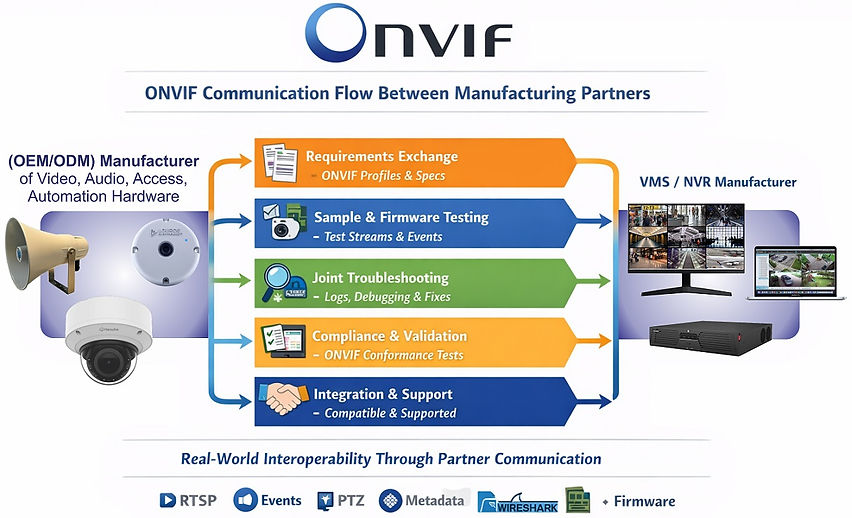
The ONVIF Process and Communication with Member or Non-Member Compliance starts with communication and work between Manufacturing Partners from the perspective of product development, OEM/ODM collaboration, and cross‑vendor interoperability both with Hardware and Software interactions and communications that involve various ongoing technical processes.
How does ONVIF conformance requirements, certification processes, and technical communication workflows operate between member manufacturers to ensure their devices interoperate reliably?
The Full Technical Breakdown
ONVIF Conformance, Compliance, and Communication Between Manufacturing Partners**
This section explains exactly how ONVIF works at a technical level between manufacturers, including:
-
ONVIF conformance requirements
-
Member vs non‑member behavior
-
Hardware‑level interactions
-
Software‑level interactions
-
API, metadata, and event mapping
-
OEM/ODM collaboration
-
Cross‑vendor debugging
-
Firmware integration
-
VMS ↔ Hardware like Camera's, Audio devices, Control Hardware devices interoperability
The Complete engineering view
1. ONVIF Conformance (What Manufacturers Actually Must Do)
1.1. ONVIF Members MUST:
-
Implement ONVIF Profiles correctly (S, G, T, M, A, C)
-
Run the official ONVIF Conformance Test Tool
-
Pass all required test cases
-
Submit results to ONVIF
-
Publish the device on the ONVIF Conformant Products List
-
Maintain conformance after firmware updates
1.2. Non‑Members CAN:
-
Implement ONVIF protocols
-
Use ONVIF‑like APIs
-
But cannot claim ONVIF conformance
-
Cannot use ONVIF branding
-
Cannot list products in the ONVIF database
This is why partner communication matters — ONVIF conformance ≠ guaranteed interoperability.
2. Hardware‑Level Technical Elements
2.1. Ethernet & PHY Behavior, Physical Layer, which is the lowest layer in the OSI model:
-
PoE negotiation (802.3af/at/bt)
-
Link speed stability (10/100/1000)
-
Auto‑MDIX behavior
-
EMI noise tolerance
-
PHY driver stability
2.2. Network Transport
-
WS‑Discovery multicast (UDP 3702)
-
RTSP/RTP streaming (TCP/UDP)
-
HTTP/HTTPS control channels
-
TLS handshake behavior
-
MTU fragmentation handling
-
IGMP snooping for multicast
2.3. Encoding & Streaming
-
H.264/H.265 profile levels
-
GOP (Group of Pictures) Structure
-
CBR/VBR CBR (Constant Bitrate) and VBR (Variable Bitrate) behavior
-
Multi‑stream synchronization
-
Audio codec support
-
Latency and jitter tolerance
These are major sources of cross‑vendor issues.
3. Software‑Level Technical Elements
3.1. ONVIF Services
Each ONVIF Profile requires specific services:
-
Device Service (capabilities, time sync, network config)
-
Media Service (streams, profiles, encoders)
-
Event Service (subscriptions, notifications)
-
PTZ Service (absolute/relative/continuous)
-
Imaging Service (exposure, focus, WDR (Wide Dynamic Range))
-
Analytics Service (metadata, rules, events)
3.2. Event & Metadata Mapping
This is where most manufacturers struggle:
-
Motion detection event XML
-
Line‑crossing / intrusion metadata
-
Bounding box formats
-
Timestamp alignment
-
Event topic naming
-
Analytics rule schemas
VMS vendors often require custom mapping because ONVIF leaves room for interpretation.
4. Firmware‑Level Technical Elements
4.1. ONVIF Stack Integration
Manufacturers must integrate:
-
SOAP messaging
-
WS‑Discovery
-
WS‑Security
-
XML schema validation
-
Event subscription engine
-
Media profile management
4.2. Firmware Bugs Commonly Found
-
Incorrect namespace in XML
-
Wrong event topic structure
-
PTZ timing issues
-
RTSP session timeout mismatches
-
Digest authentication failures
-
TLS cipher incompatibility
These require joint debugging with partners.
5. OEM/ODM Collaboration Workflow (Real‑World Process)
5.1. Requirements Exchange
Partners exchange:
-
ONVIF Profile requirements
-
Supported features
-
Firmware versions
-
API documentation
-
Test logs
5.2. Engineering Sample Exchange
Camera vendor sends:
-
Hardware samples
-
Beta firmware
-
ONVIF test logs
-
Wireshark captures
-
Debug logs
VMS vendor tests:
-
Discovery
-
Streaming
-
PTZ
-
Events
-
Analytics metadata
-
Recording/playback
5.3. Joint Debugging
This is the core of partner communication:
-
Fixing XML schema mismatches
-
Adjusting event formats
-
Correcting PTZ command timing
-
Aligning metadata
-
Fixing RTSP transport issues
-
Updating firmware
-
Updating VMS drivers
This is where your Asian OEM/ODM experience and resources is extremely valuable.
6. Cross‑Vendor Interoperability (What Actually Happens)
6.1. Basic Interoperability:
-
Device shows up in VMS
-
Streams load
-
Audio& Video is present
-
PTZ works
6.2. Functional Interoperability
-
Events trigger correctly
-
Recording is stable
-
Playback works
-
Multi‑stream support
6.3. Advanced Interoperability
-
AI analytics metadata
-
Multi‑sensor stitching
-
Thermal + visible fusion
-
Smart event mapping
-
Proprietary feature bridging
This requires deep communication between engineering teams.
7. Member vs Non‑Member Communication
Members:
-
Must maintain ONVIF conformance
-
Must ensure interoperability
-
Participate in ONVIF working groups
-
Share test logs and firmware with partners
Non‑Members:
-
Often rely on reverse‑engineered ONVIF stacks
-
Require more partner‑side testing
-
Cannot claim conformance
-
Often have more interoperability issues
8. The Real Summary (Engineering‑Accurate)
ONVIF provides the rules. Conformance ensures minimum compliance. Partner communication ensures real interoperability. Firmware integration ensures stability. OEM/ODM collaboration ensures product success.
This is the complete technical picture.
Diagram showing ONVIF communication flow
Industries That Rely on AV Security Systems and their Support Systems
Video and audio surveillance isn’t a one-size fits all. It’s deployed across:
-
Retail: Prevent theft, monitor customer behavior, and verify transactions
-
Healthcare: Monitor patient safety, ensure staff compliance, and detect emergencies
-
Education: Secure campuses, manage access, and respond to threats
-
Transportation: Monitor traffic flow, detect accidents, and manage logistics
-
Hospitality: Ensure guest safety, monitor service areas, and manage crowd control
-
Manufacturing: Oversee production lines, detect anomalies, and ensure safety compliance
-
Finance: Secure ATMs, monitor teller interactions, and prevent fraud
-
Residential: Deter intrusions, enable remote monitoring, and support smart home automation
-
Law Enforcement & Correctional facilities: Law enforcement and correctional facilities rely on audio-video CCTV systems as a critical layer of security, accountability, and operational control. These systems go far beyond passive monitoring they actively support crime prevention, incident response, and legal documentation.
-
Captures real-time footage of criminal activity, traffic stops, and public interactions
-
Provides video evidence for court proceedings and internal reviews
-
Supports forensic analysis through timestamped, high-resolution recordings
-
Records verbal exchanges during arrests, interrogations, or public encounters
-
Helps verify officer conduct and suspect behavior
-
Enables two-way communication in remote surveillance setups
-
Tracks movement and behavior in cells, corridors, and common areas
-
Detects violent incidents, self-harm attempts, and contraband exchanges
-
Audio-video systems help staff respond faster and more accurately
Behavioral Analytics:
-
Crowd detection alerts staff to unauthorized gatherings
-
Object recognition identifies weapons or smuggled items
-
Audio analytics detect rising tension or verbal aggression before violence erupts
Incident Documentation & Legal Protection:
-
Provides irrefutable evidence in cases of misconduct, assault, or escape attempts
-
Supports internal investigations and protects staff from false accusations
-
Enhances transparency and compliance with oversight agencies
Integration & Efficiency
-
Modern systems use centralized software platforms to manage feeds, alerts, and storage
-
AI-powered analytics reduce staff workload by automating detection and flagging anomalies
-
Remote access allows supervisors to monitor multiple facilities in real time
How PoE Enhances ONVIF Hardware
-
Simplified Setup ONVIF cameras with PoE require just one cable for both connectivity and power, making installation faster and cleaner, especially in large deployments.
-
Interoperability ONVIF ensures that PoE-enabled devices from different manufacturers can work together. For example, a PoE camera from Brand A can connect to an ONVIF-compliant NVR from Brand B without compatibility issues.
-
Scalability PoE makes it easier to expand surveillance systems. You can add more ONVIF cameras without worrying about nearby power outlets or complex wiring.
-
Remote Management Many ONVIF-compatible PoE devices support remote rebooting and diagnostics, which is handy for troubleshooting without physical access.
-
Cost Efficiency Reduces installation costs by eliminating the need for separate electrical wiring and outlets that use independent power supplies that may be inaccessible if and when a power failure occurs.
For more information on my Networking & PoE Knowledge, Click Here
ONVIF- Member Compliant Companies with Their Own Hardware and Management Software
Axis
AxxonSoft
Bosch
Genetec
Hanwha
Infinova
Milestone Systems
Speco Technologies
You can browse the full list of ONVIF-conformant products and manufacturers on the ONVIF Conformant Products Database
CCTV Video Hardware

Outdoor 360 Degree IP PoE Dome Camera

Indoor IP PoE Dome Camera

Outdoor IP PoE Bullet Camera with Night Vision
Audio Hardware
Indoor/Outdoor IP Listen Audio Microphone

2 Way Indoor Talk/Listen IP Ceiling Speaker/Microphone

2 Way Audio Talk/Listen IP Audio Indoor/ Outdoor Paging Horn
VMS (Video Management Systems)
A Video Management System (VMS) is a software solution designed
to oversee, capture, and interpret audio and video from surveillance
devices, offering centralized monitoring and control for both security
and operational needs.
VMS platforms combine hardware components, such as cameras, encoders, and servers with software tools that enable live viewing, recording, storage, retrieval, and advanced video analytics. They allow organizations to monitor real-time activity, access archived footage, and configure alerts for unusual events or system notifications. Modern systems typically support cloud, on-premise, or edge-based storage, maintain interoperability with multiple camera manufacturers through ONVIF standards, and integrate seamlessly with complementary technologies like audio only devices, alarm systems, access control, and building management platforms.
Advantages of Video Management Systems (VMS):
-
Improved Security: Continuous monitoring and intelligent analytics enable rapid identification and response to potential risks.
-
Streamlined Operations: Centralized control simplifies video oversight and enhances management across multiple facilities.
-
Expandable Architecture: Easily scales to support additional cameras, devices, or new locations as needs grow.
-
Versatile Deployment: Compatible with wired, wireless, and IP-based infrastructures, including AV-over-IP technologies.
-
Reduced Costs: Cloud-based options minimize reliance on physical hardware and lower ongoing maintenance expenses.
-
Actionable Insights: Advanced video analytics provide valuable data to optimize operations, reduce losses, and support business growth.
-
Ability to Manage hardware: Onsite or remotely from multiple locations

T
Video Hardware in CCTV Surveillance Security
Audio Hardware in CCTV Surveillance Security
Audio has become a critical layer in modern CCTV security systems because it transforms passive visual monitoring into active situational awareness. Video alone shows what happened, but audio reveals how and why, capturing voices, alarms, distress sounds, and environmental cues that cameras can’t see. In today’s environments, integrated microphones and two‑way audio enable real‑time communication with intruders or staff, verify events through sound analytics such as aggression or gunshot detection, and provide legally valuable evidence that complements video footage. For law enforcement, retail, healthcare, and smart‑building applications, synchronized audio and video create a multidimensional record that improves response accuracy, reduces false alarms, and strengthens accountability across every level of security management.
Note! Some states require a posted and visible sign or applicable notifications when listening and recording in indoor-outdoor areas.
States Laws on Consent regarding Audio Recording
36 states and Washington D.C. employ “one-party” consent laws. If you are a party to the conversation, then you are able to record it. If not, then you will need the consent of one party in the conversation to record it.
15 states employ “all-party” consent laws. This requires all parties involved in the conversation to consent to recording.
A.) Lawful Monitoring Audio monitoring is permitted when individuals have been informed in advance and agree to it. Once consent is given, there is no reasonable expectation of privacy regarding recorded conversations.
B.) Expectation of Privacy In public or semi‑public areas, clearly posted signs stating that audio surveillance is in use remove any assumption that conversations are private.
C.) Implied Consent When a person chooses to remain in an area after seeing signage that alerts them to audio monitoring, their continued presence is treated as implied consent to being recorded.
Resources
U.S. Federal Law
State Laws
About Audio Analytics
Audio analytics have become a defining advancement in CCTV and ONVIF‑based security systems because they extend surveillance beyond visual detection into intelligent sound interpretation. Modern audio analytics engines can identify aggression, gunshots, breaking glass, distress calls, or abnormal noise patterns, triggering events even when cameras have limited visibility. When integrated through ONVIF Profile T and Profile M, these audio streams and metadata are standardized, allowing compliant cameras, recorders, and VMS platforms from different manufacturers to exchange sound events seamlessly. This interoperability means a gunshot detected by one brand’s microphone can instantly alert another brand’s VMS or trigger PTZ tracking, ensuring unified response across mixed hardware environments. In short, ONVIF integration turns audio from a passive recording feature into an active, interoperable layer of situational intelligence that strengthens real‑time awareness and forensic accuracy in today’s security ecosystems.
Some IP Microphone hardware can detect the following audio events:
-
Explosions
-
Emergency Sirens
-
Glass breaking
-
Screaming & Yelling, Threats of Violence
Audio detection does come with its limitations
Limitations of Audio Security Analytics Detection & Reliability:
Audio analytics add powerful capabilities to CCTV systems, but their performance is heavily influenced by the acoustic environment, microphone quality, and algorithm design. Below is a structured breakdown of the key limitations integrators, manufacturers, and end‑users must understand.
1. Environmental Noise Interference
Background noise is the single biggest factor affecting detection accuracy.
-
High‑noise areas (factories, gyms, nightclubs, traffic corridors) can mask critical sounds.
-
Constant broadband noise (HVAC, fans, machinery) reduces signal‑to‑noise ratio.
-
Sudden transient noises (doors slamming, dropped objects) often trigger false positives.
-
Outdoor environments introduce wind noise, echo, and unpredictable acoustic reflections.
Impact: Reduced reliability for aggression detection, scream detection, and gunshot analytics.
2. Microphone Placement & Hardware Limitations
Even the best analytics fail if the microphone cannot capture clean audio.
-
Distance from the sound source dramatically reduces detection accuracy.
-
Obstructions (walls, glass, shelving, vehicles) block or distort sound waves.
-
Low‑quality or built‑in camera microphones have limited frequency response and dynamic range.
-
Directional vs. omnidirectional microphones affect coverage and sensitivity.
Impact: Missed events, inconsistent detection, and degraded metadata quality.
3. Acoustic Variability Across Environments
Analytics engines are trained on specific acoustic patterns—but real‑world environments vary widely.
-
Reverberant spaces (warehouses, atriums) smear transient sounds.
-
Soft‑surface rooms (carpeted offices, classrooms) dampen sound signatures.
-
Outdoor spaces introduce reflections from buildings, vehicles, and terrain.
-
Crowded environments create overlapping speech and noise sources.
Impact: Algorithms may misclassify sounds or fail to detect them entirely.
4. Algorithmic Limitations
Even advanced AI‑based audio analytics have inherent constraints.
-
False positives from similar‑sounding events (e.g., fireworks vs. gunshots).
-
False negatives when sound signatures fall outside trained models.
-
Limited language or accent recognition for voice‑based analytics.
-
Difficulty isolating a single sound source in multi‑source environments.
Impact: Reduced trust in automated alerts without human verification.
5. ONVIF Integration Constraints
ONVIF Profiles (primarily Profile T and Profile M) support audio and metadata exchange, but:
-
Not all manufacturers implement the full audio event schema.
-
Metadata formatting varies, even within ONVIF guidelines.
-
Some VMS platforms only partially support ONVIF audio events.
-
Proprietary analytics often require custom drivers beyond ONVIF.
Impact: Cross‑vendor interoperability may be inconsistent without partner‑side testing.
6. Legal & Compliance Limitations
Audio surveillance is subject to strict regulations.
-
Two‑party consent states require explicit notification.
-
Signage requirements vary by jurisdiction.
-
Restricted environments (healthcare, financial institutions) may limit audio recording.
-
Retention policies for audio differ from video.
Impact: Systems may need to disable or limit audio analytics in certain areas.
7. Environmental Conditions & Weather
Outdoor microphones face additional challenges:
-
Wind noise
-
Rain impact noise
-
Temperature‑related microphone drift
-
Wildlife and environmental sounds
-
Vehicle echoes in urban canyons
Impact: Increased false alarms and reduced detection accuracy.
8. Network & System-Level Constraints
Audio analytics depend on stable system performance:
-
Low bandwidth can degrade audio quality.
-
High latency affects real‑time detection.
-
Compression artifacts (AAC, G.711, G.726) distort sound signatures.
-
Edge devices may have limited processing power for advanced analytics.
Impact: Delayed or inaccurate event reporting.
Summary
Audio analytics significantly enhance CCTV systems, but their reliability is highly dependent on environment, hardware quality, algorithm design, and ONVIF implementation. Understanding these limitations is essential for accurate system design, realistic expectations, and successful deployment across diverse environments.