I’m a self‑driven, results‑focused professional with a broad skill set and a proven history of delivering meaningful impact. I don’t just provide solutions; I actively pursue them. When I don’t have an answer or direction, I research, test, and uncover it. My priority is helping organizations grow, perform, and succeed through competence, adaptability, and strategic execution.
Engineering, Technical Experience & Services
Phone: 661-365-5792

-
Product R&D and Product Management, Design for Manufacturing (DFM) across Consumer Electronics, Pro/Commercial environments for Audio‑Video, Security, Home Automation, LED Lighting, AC/DC Power, Wired/Wireless Networking, and IP/PoE systems. Experienced in taking hardware and software designs from proof‑of‑concept through full product launch.
-
Value‑Added Product Solutions Engineer with deep expertise in creating innovative, market‑ready solutions.
-
Electronic Engineering, Technical CAD drawings, and Consulting for product development, system architecture, and engineering documentation control/management.
-
Residential and Pro Audio/Commercial AV, Lighting, Security and Automation System Integration, including technical design, system layout, and implementation strategies for new construction projects and retrofits.
-
Creation and design of product catalogs, brochures, technical literature, instruction manuals with detailed product information/ technical specifications, packaging, website technical information/diagrams, and application notes.
-
UI/UX Design for intuitive, user‑focused interfaces across hardware and software platforms.
-
Development of technical training materials and support documentation for sales teams, trade shows, and partner education.
-
Creation of technical concepts, imagery, and presentations for customer engagement, email campaigns, LinkedIn content, training, and marketing initiatives.
-
Marketing support through technical resources, product insights, and strategic guidance to strengthen brand awareness and identify key markets and customer segments.
-
Extensive familiarity with industry leaders in AV and home automation products, systems, and technologies.
Please Note! This website is constantly in flux and a work in progress and is being updated, modified on a reqular basis.
(UCC) Unified Communications and Collaboration &
(VC) Video Conferencing Technologies
(VC) Video conferencing allows individuals or groups in different locations to engage in live, face-to-face interaction through internet-connected devices, integrating audio, video, and collaborative tools like screen sharing to replicate the experience of an in-person meeting. AV, short for Audio Visual, encompasses a wide array of digital audio and video technologies designed to enhance communication and collaboration. In today’s corporate landscape, AV equipment plays a vital role across diverse settings—from meetings and presentations to video conferences and interactive workspaces. There are many manufactures, products, tools and design considerations when putting a system together for clients.
"It’s not about creating a room with lots of elaborate Technology, it's creating one that actually works well for your Clients and their Needs"
Unified Communications and Collaboration (UCC)
-
Scope: Broad, integrated platform combining multiple communication tools.
-
Includes:
-
Voice (IP telephony)
-
Instant messaging
-
Presence (availability status)
-
Email and unified messaging
-
Audio/video/web conferencing
-
Desktop and file sharing
-
Collaboration tools (e.g., whiteboarding, scheduling)
-
-
ROI Potential: Higher upfront investment, but long-term gains in efficiency, employee engagement, and IT consolidation.
-
Goal: Seamless communication across devices and channels, enabling real-time and asynchronous collaboration.
-
Example platforms: Microsoft Teams, Cisco Webex, Zoom (with full UC suite), Mitel
Video Conferencing (VC)
-
Scope: Focused on real-time video and audio communication.
-
Includes:
-
Video calls and meetings
-
Screen sharing
-
Basic chat during meetings
-
-
ROI Potential: Lower cost and complexity but limited in scope. May require additional tools for messaging, file sharing, or scheduling.
-
Goal: Enable face-to-face interaction remotely. VC tools focus on real-time meetings.
-
Example platforms: Zoom (basic), Google Meet, Skype, BlueJeans
An efficient video conference should empower use, not complicate the experience. With a streamlined touch control interface, participants can launch calls, adjust volume, and switch sources effortlessly, without relying on a technician or navigating complex controls.
Enterprise Conference Room Systems
Enterprise conference room systems are comprehensive AV solutions designed to support high-quality communication, collaboration, and control across corporate environments. These systems go far beyond basic video calls, they’re engineered for scalability, integration, and performance across multiple room types and locations. These systems often include advanced audiovisual technology, such as high-resolution displays, AI-powered cameras, and microphones, to ensure clear and professional presentations. They also integrate with existing systems for seamless operation and scalability.
What Defines an Enterprise Conference Room System?
Enterprise systems are built to meet the demands of large organizations, offering:
-
Standardized AV Infrastructure across multiple rooms and locations.
-
Seamless Integration with platforms like Microsoft Teams, Zoom, and Webex.
-
Scalable Architecture for small huddle spaces to large boardrooms.
-
Centralized Management for IT teams to monitor, update, and troubleshoot remotely.
-
Premium Audio & Video Quality to ensure clarity and engagement for all participants.
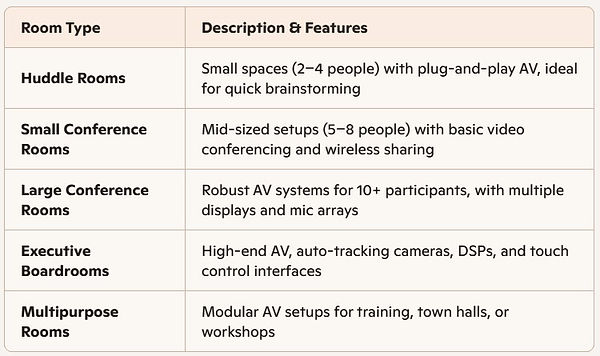
Room Types, Configurations & Use Cases
Key Components
-
Hardware: Cameras, microphones, speakers, HD Displays & Projectors for Crisp visual, different systems ranging from simple webcams to complex dedicated conference room technologies.
-
Software Connectivity Platforms like: Zoom, Microsoft Teams, Google Meet, Webex, RingCentral, GoToMeeting and newer entrants like AONMeetings4.
-
Network Infrastructure: High-speed internet and cloud-based servers for data transmission.
-
Security Protocols: Encryption, multi-factor authentication, and compliance with standards like HIPAA for sensitive industries.
-
Software & Hardware Automation Control Systems like: Crestron, Control4, etc. may be required for larger and more elaborate room requirements like Touchscreen interfaces for source switching, audio settings/control, and HVAC, Lighting automation.
-
Audio Software & Hardware DSP's: That deals with enhancing and creating quality audio, helping with echo cancellation, noise suppression issues.
-
Independent or integrated Room Scheduling systems, for: Real-time availability and booking integration.
-
Content Sharing: Ability to share content from la[tops wired or wirelessly.
Integration with Enterprise Tools
-
Unified Communications Platforms: Native support for Teams, Zoom, Webex.
-
Calendar Sync: Integration with Outlook or Google Calendar for seamless scheduling.
-
Building Management Systems (BMS): Automated lighting, climate, and AV presets.
-
Remote Monitoring & Support: IT teams can manage firmware, troubleshoot, and push updates from a central dashboard.
Enterprise systems are designed for consistency across offices, campuses, or global branches:
-
Standardized Equipment & Software
-
Repeatable Room Templates
-
Centralized AV Playbooks for Deployment
-
Cloud-Based Management Platforms
-
Plug-and-Play Simplicity
-
Multi-Screen Display and Content Sharing
-
Scalability and Integration
Core AI Features in Modern Conference Rooms
1. Auto-Framing & Speaker Tracking
-
Cameras use AI to detect and follow active speakers, dynamically adjusting framing and zoom.
-
Systems like Logitech Sight and Huddly’s AI director tech ensure every participant is visible—even in hybrid meetings.
2. Real-Time Transcription & Translation
-
AI engines transcribe speech instantly and can translate it into multiple languages.
-
Platforms like Zoom and Microsoft Teams offer built-in transcription and multilingual support, ideal for global teams
3. Meeting Summaries & Action Item Extraction
-
AI assistants generate concise summaries, highlight decisions, and track follow-ups.
-
Zoom’s AI Companion and Microsoft Copilot are leading examples of this feature.
4. Voice--Activated Controls
-
Users can start meetings, adjust audio volume, or switch sources using voice commands.
-
Integrated with smart voice technologies like Josh.ai using professional automation control systems like (Control4, Crestron, Savant), Click Here, also with Alexa for Business using Crestron, Click Here.
5. Smart Gallery & Intelligent Layouts
-
AI separates in-room participants into individual video feeds for remote attendees.
-
Enhances equity and visibility in hybrid meetings.
6. Gesture Recognition & Contextual Framing
-
Advanced systems respond to hand gestures or movement to switch camera views or trigger actions.
-
Useful in training rooms, town halls, and dynamic presentations
7. Noise Suppression & Acoustic Optimization
-
AI filters out background noise, HVAC hum, and keyboard clicks in real time.
-
Reduces the need for physical soundproofing and improves clarity across all endpoints.
8. Echo Cancellation
-
Using machine learning, systems predict and eliminate echo caused by sound reflections in the room. This is especially critical in glass-walled or large spaces where traditional acoustic treatments fall short
9. Beamforming Microphones
-
AI-enhanced beamforming mics dynamically focus on the active speaker, even as they move. These arrays adapt in real time, improving intelligibility and reducing crosstalk from side conversations
10. Room-Adaptive Audio Tuning
-
Some systems use AI to analyze room acoustics and automatically adjust EQ, gain structure, and mic sensitivity based on occupancy and layout changes
11. Multi-Zone Audio Management
-
AI helps divide rooms into audio zones, ensuring microphones and speakers are optimized for each area. This prevents dropouts and maintains consistent audio coverage
12. Predictive Scheduling & Room Utilization Analytics
-
AI analyzes usage patterns to optimize room bookings and suggest ideal meeting times.
-
Helps facilities teams manage space more efficiently and reduce scheduling conflicts.
Microphone Audio Measurements & Placement
Existing Conference Rooms that need completely new technology or need some new updated technologies to integrate into existing hardware follow similar design and technical requirements as systems that are built entirely from the ground up to meet specific requirements. Microphone design and placement is crucial for good voice communication audio. Room size, acoustics and various technical concerns need to be addressed to create the best location and technologies for microphone. This includes size of the room, ambient noise level SPA-weighted, NC (Noise Criteria) levels in each octave, SNR measurements, RT60 measurements: the reverberation time of the room, the time for the sound to decay 60db. Specific certified audio calibration tools are necessary to measure these elements to accurately make measurements to determine the type of mic(s) needed and where to place them.
"Create Reliable & Scalable Solutions"


Hardware Devices
Touchscreens

Microphones

Camera's

Audio, AV Soundbars

Camera with AV Soundbars

HD Displays

HD Projection Systems
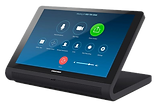
Touchscreens
Touchscreens and their effective usage
There are a variety of hardware and software platforms that use fixed-mounted, portable touchscreens and or other portable devices to interact and manage systems with different requirements and complexities.
-
Independent Intuitive Meeting Control Touch panels like the Yealink MTouch or BenQ DuoBoard allow users to start meetings, adjust audio/video settings, and manage participants with simple taps, no need for remotes or complex interfaces.
-
Interactive Whiteboarding Platforms like Zoom Rooms for Touch support real-time annotation, drawing, and brainstorming directly on the screen. This is ideal for team ideation, client presentations, and hybrid collaboration.
-
Content Sharing & Annotation Users can share documents, annotate slides, and highlight key points during meetings. This boosts engagement and clarity, especially in training or strategy sessions.
-
Multi-Platform Compatibility Many touchscreens support Android, iOS, Windows, and macOS, making them flexible for BYOD (Bring Your Own Device) environments.
-
Dual-Screen & Extension Options Advanced setups like Yealink’s MTouch Plus-EXT offer dual-screen functionality, allowing simultaneous control of participant lists and shared content, ideal for large or divisible rooms

Microphones
To ensure every participant is heard clearly and consistently, it's essential to select a microphone with the appropriate connectivity, pickup pattern, and audio quality. Equally important is strategic placement to maintain optimal levels and minimize dropouts or distortion especially in hybrid meetings, where remote attendees rely solely on audio clarity for full engagement.
Microphone Integration with AV Systems
-
Voice Capture & Clarity: High-quality microphones are essential for capturing speech with precision, ensuring every participant is heard clearly. This is especially critical in hybrid meetings, where remote parties rely entirely on audio fidelity.
-
Noise Reduction & Echo Cancellation: Many modern microphones incorporate DSP-based features such as ambient noise suppression and acoustic echo cancellation. These technologies help maintain a clean, intelligible signal, even in acoustically reflective or noisy environments.
-
(Pickup Patterns) Directional vs. Omnidirectional: Directional Microphones (e.g., cardioid) focus on sound from a specific area, making them ideal for podiums, executive seating, or presenter zones. Omnidirectional Microphones capture sound from all directions, offering balanced coverage for roundtable discussions, huddle spaces, or collaborative group settings.
-
DSP Routing: Microphones are routed through Digital Signal Processors (DSPs) for precise mixing, equalization, and gating, ensuring optimal gain structure and minimizing feedback across the system.
-
Control Interfaces: Many table microphones feature integrated mute buttons, LED indicators for functions, and touch-sensitive controls, enhancing user accessibility and interaction.
-
Networked Audio Ecosystems: Leading brands like Shure and Biamp offer fully networked audio platforms where microphones, speakers, and DSPs communicate seamlessly. This streamlines configuration, control, and scalability across complex AV environments.
Dante connected Beamforming Ceiling Microphone
Dante Beamforming Ceiling Microphone Features:
-
The Yealink CM50 integrates AI-based sound optimization to ensure immersive sound quality. With support for Dante protocol, it ensures easy integration with other Dante-compatible devices.
-
With 127 wide-range microphones, the Yealink CM50 provides superior audio coverage within a 5-meter radius*. Its advanced beamforming technology supports customized pickup zones, allowing precise control over audio capture and reducing unwanted background noise.
-
Use the Yealink Room Designer software when using the Yealink CM50 for effortless setup and superior acoustic performance for all your projects.
-
In-Ceiling, On-Ceiling, Cable Suspension from Ceiling mounting options.


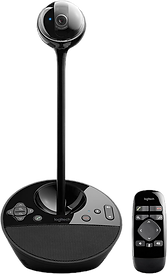
Camera's
Fixed Cameras for Conference Rooms, Portable or Mobile use
Definition: Fixed cameras are stationary video devices with a set field of view. They do not pan, tilt, or zoom automatically.
Use Cases:
-
Small to medium-sized rooms with predictable seating arrangements
-
Spaces where simplicity and reliability are prioritized
-
Budget-conscious installations or single-camera setups
Advantages:
-
Easy to install and configure
-
Lower cost and minimal maintenance
-
Ideal for static framing of a room, conference table, podium, table, or whiteboard
Limitations:
-
Limited coverage—cannot follow speakers or adapt to dynamic movement
-
May require multiple units to cover larger rooms or varied angles
-
Less immersive experience for remote participants
Auto-Tracking Cameras in Conference Rooms
Definition: Auto-tracking cameras use AI or motion detection to follow active speakers or presenters, adjusting pan, tilt, and zoom dynamically.
Use Cases:
-
Large boardrooms, training centers, auditoriums
-
Hybrid meetings with roaming presenters or multiple speakers
-
Environments where speaker visibility and engagement are critical
Key Features:
-
Presenter Tracking: Follows a moving speaker across the room or stage
-
Auto-Framing: Adjusts view to include all participants or zooms in on the active speaker
-
AI Enhancements: Some models offer facial recognition, voice tracking, and scene analysis for intelligent framing
Examples:
-
Poly Director AI: Smart framing and speaker tracking with Teams/Zoom integration
-
VDO360 TridentAI: 4K auto-tracking with NaturalVision™ AI and beamforming mic array
-
Crestron 1Beyond: Broadcast-quality PTZ with predictive framing
-
Q-SYS Seervision: Adaptive full-body tracking and scene analysis
Advantages:
-
Dynamic and immersive experience for remote attendees
-
Reduces need for manual camera switching or presets
-
Enhances meeting equity by keeping all speakers visible
Limitations:
-
Higher cost and complexity
-
Requires calibration and sometimes integration with DSPs or control systems
-
May need beamforming mics or preset recall systems for optimal performance

AV Soundbars
Cameras built into AV soundbars are transforming the way conference rooms and collaborative spaces are designed, offering a sleek, all-in-one solution that merges audio, video, and control into a single device.
An AV soundbar integrates three core components:
-
High-quality speaker system
-
Beamforming microphone array
-
HD or 4K conferencing camera
Some Benefits of using AV Soundbars:
-
Space-Saving
-
Cost-Effective
-
Simplicity and Convenience
-
They’re ideal for small and larger meeting rooms
-
Visual Clutter Reduction
Audio only Soundbars
An Audio soundbar is used just for audio output only, typically mounted to a wall.
An AV soundbar is an all-in-one device that integrates a high-quality camera, microphone and speaker audio into a single piece of equipment designed to be mounted on a wall, usually under the video display or placed on a conference table. This cutting-edge all in one piece of hardware aims to enhance video conferencing by delivering clear 2-way audio and crisp video, ensuring participants can see and hear each other as if they were in the same room. These devices come with different specifications with connectivity, features and audio speaker output power delivery.


Fixed HD Displays
HD displays play a vital role in modern conference rooms, serving as the visual centerpiece for meetings, communication, collaboration, and presentations.

Single & Dual Fixed HD Displays used in Conference Rooms
-
Visual Clarity & Engagement HD (and increasingly UHD/4K) displays deliver crisp, high-resolution visuals that enhance presentations, video calls, and shared content. This clarity ensures that text, graphics, and facial expressions are easily visible, even from the back of the room.
-
Content Versatility: These displays support a wide range of inputs from laptops and wireless sharing devices to video conferencing platforms, making them ideal for displaying slides, spreadsheets, live feeds, and interactive whiteboards.
-
Collaboration Enhancement: When paired with touch capabilities or integrated software (e.g., Zoom Rooms, Microsoft Teams Rooms, Google Meet), HD displays become interactive hubs for brainstorming, annotation, and real-time editing.
Dual HD Display Setup
-
Dual displays are positioned side-by-side or strategically within the room. One screen typically shows the video conference feed (remote participants), while the other displays shared content (presentations, documents, apps).
Advantages of Dual HD Displays
-
Enhanced Collaboration: Allows simultaneous viewing of participants and content.
-
Improved Meeting Flow: No need to toggle between views, everything is visible at once.
-
Supports Complex AV Workflows: Ideal for rooms with integrated control systems, switchers, and codecs.
-
Professional Presence: Creates a more immersive and polished experience for high-stakes meetings.
Projection Displays
Projection displays are used in conference rooms for several strategic and practical reasons, especially when large-scale visuals, flexible room design, and cost efficiency are top priorities.
Projection displays can easily scale up to 100–300 inches or more, making them ideal for large conference rooms, training centers, or multi-purpose halls.
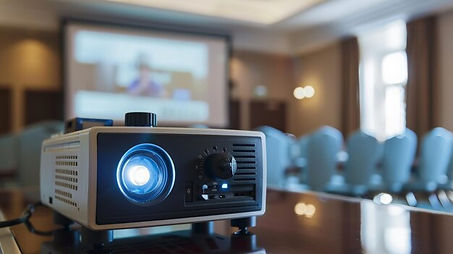

Projection vs. Fixed HD Displays: Key Comparison

Conference Room Table Retrofit on demand Cable Connectivity Boxes
Provides Hardwired Audio-Video, Network, AC Outlets and USB Charging/Data access.
-
With a simple press, the box tilts up at a 45° angle, revealing essential ports for power, data, and AV connections.
-
Ideal for meetings where users need quick access to plug in laptops, share content, or charge devices.

Rectangle hidden beautiful flush appearance that Pops Up with connectivity when needed


Round hidden beautiful flush
appearance that Pops Up with
connectivity when needed
Rectangle exposed connectivity
when needed
Computer Connectivity Peripherals for Conference Rooms
Table Connectivity Boxes:
-
Pop-up or flush-mounted modules with HDMI, USB-C, DisplayPort, and power outlets
-
Often include Ethernet ports, audio jacks, and USB hubs
-
Brands: Extron Cable Cubby, Crestron FlipTops, StarTech
Docking Stations:
-
Provides a one-cable laptop docking via USB-C or Thunderbolt
-
Includes HDMI/DisplayPort, USB-A/USB-C, Ethernet, and charging
-
Ideal for BYOD setups and hot-desking environments
Wireless Presentation Systems:
-
Allow users to share AV content without cables
-
Examples: Barco ClickShare, Mersive Solstice, Airtame, Crestron AirMedia
-
Supports AV over Wi-Fi, screen mirroring, and app-based control
HDMI/USB-C Wall Plates:
-
Use wall-mounted interfaces for clean cable management
-
Enables direct connections to displays or AV switchers
-
Often paired with HDBaseT extenders for long-distance signal transmission
AV-over-IP Interfaces:
-
Devices like Dante AV, NDI, or SDVoE encoders/decoders
-
Allow computers to send/receive AV signals over the network
-
Useful in scalable or multi-room deployments
USB Hubs & Audio Interfaces:
-
Expand USB connectivity for webcams, mics, and control surfaces
-
Audio interfaces allow laptops to connect to DSPs or mixers
Power Delivery & Charging Stations:
-
Integrated AC outlets and USB charging ports
-
Support high-wattage USB-C PD (Power Delivery) for laptops and tablets
Popular Conference Room Hardware & Software Manufactures
-
AONMeetings4
-
Avaya
-
Aver
-
Bosch Dicentis
-
GoToMeeting (VC) Meeting Software
-
Google Meet (VC) Meeting Software
-
HuddleCam HD
-
Jabra
-
LG
-
Microsoft Teams (VC) Meeting Software
-
Owl lab
-
Panasonic
-
Pexip
-
Poly Formerly Plantronics and Polycom
-
PTZOptics
-
RingCentral (VC) Meeting Software
-
Q-SYS
-
Sennheiser
-
Sharp
-
Team Connect Microphones
-
Utelogy Software
-
Visionary Solutions
-
Webex (VC) Meeting Software
-
Zoom (VC) Meeting Software
-
Zoom Rooms
BYOD (Bring Your Own Device)
Conference rooms are designed to offer maximum flexibility by allowing users to connect their personal laptops, tablets, or smartphones to the room’s AV system, without relying on dedicated room-based codecs or proprietary platforms. These setups are increasingly popular in hybrid work environments where agility, compatibility, and cost-efficiency are key.
What Defines a BYOD Conference Room?
A BYOD (Bring Your Own Device) conference room empowers users to initiate meetings directly from their personal laptops, tablets, or smartphones while seamlessly integrating with the room’s high-performance AV infrastructure. This includes professional-grade cameras, microphones, speakers, and displays.
Unlike platform-specific environments such as Zoom Rooms or Microsoft Teams Rooms, BYOD setups are platform-agnostic. They support a wide range of conferencing applications Google Meet, Webex, Slack, and others giving users the freedom to choose the tools that best suit their workflow.
Ideal Use Cases
-
Small to mid-sized meeting rooms
-
Huddle spaces and breakout areas
-
Organizations with mixed UC platforms
-
Remote-first or hybrid workforces
-
Budget-conscious AV deployments
Microsoft Teams Rooms (MTR)
A Microsoft Teams Room (MTR) is a certified, turnkey meeting room solution that brings the full Microsoft Teams collaboration experience into a physical conference space. It combines dedicated hardware, Teams‑optimized software, and room‑aware controls to deliver consistent, reliable video conferencing across huddle rooms, conference rooms, boardrooms, and training spaces.
Microsoft Teams Rooms (MTR) — Explained Clearly
A Microsoft Teams Room (MTR) is a certified, turnkey meeting room solution that brings the full Microsoft Teams collaboration experience into a physical conference space. It combines dedicated hardware, Teams‑optimized software, and room‑aware controls to deliver consistent, reliable video conferencing across huddle rooms, conference rooms, boardrooms, and training spaces.