I’m a self‑driven, results‑focused professional with a broad skill set and a proven history of delivering meaningful impact. I don’t just provide solutions; I actively pursue them. When I don’t have an answer or direction, I research, test, and uncover it. My priority is helping organizations grow, perform, and succeed through competence, adaptability, and strategic execution.
Engineering, Technical Experience & Services
Phone: 661-365-5792

-
Product R&D and Product Management, Design for Manufacturing (DFM) across Consumer Electronics, Pro/Commercial environments for Audio‑Video, Security, Home Automation, LED Lighting, AC/DC Power, Wired/Wireless Networking, and IP/PoE systems. Experienced in taking hardware and software designs from proof‑of‑concept through full product launch.
-
Value‑Added Product Solutions Engineer with deep expertise in creating innovative, market‑ready solutions.
-
Electronic Engineering, Technical CAD drawings, and Consulting for product development, system architecture, and engineering documentation control/management.
-
Residential and Pro Audio/Commercial AV, Lighting, Security and Automation System Integration, including technical design, system layout, and implementation strategies for new construction projects and retrofits.
-
Creation and design of product catalogs, brochures, technical literature, instruction manuals with detailed product information/ technical specifications, packaging, website technical information/diagrams, and application notes.
-
UI/UX Design for intuitive, user‑focused interfaces across hardware and software platforms.
-
Development of technical training materials and support documentation for sales teams, trade shows, and partner education.
-
Creation of technical concepts, imagery, and presentations for customer engagement, email campaigns, LinkedIn content, training, and marketing initiatives.
-
Marketing support through technical resources, product insights, and strategic guidance to strengthen brand awareness and identify key markets and customer segments.
-
Extensive familiarity with industry leaders in AV and home automation products, systems, and technologies.
Please Note! This website is constantly in flux and a work in progress and is being updated, modified on a reqular basis.
Explore
Pro/Commercial Audio Systems & Technology
“Engineering Sound That Performs With Purpose"


Pro Audio
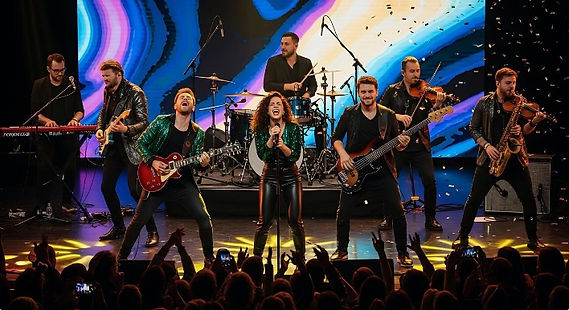
Pro audio refers to professional-grade sound reinforcement for live, studio, and broadcast systems that utilize specialized hardware such as mixing consoles, studio microphones, preamplifiers, outboard processors (compressors, equalizers, effects), power amplifiers, and high-performance monitors or PA speakers, live audio speaker arrays. Analog and digital audio interfaces, digital audio network hardware and software such as Dante, industry standard (DAWS) Digital Audio Workstations using popular software such as Ableton Live, Cubase, FL Studio and Pro Tools
Audio signals and Technologies used in Pro/Commercial Audio:
-
Line Level Audio
-
Mic Level Audio
-
Digital Audio
-
Audio over IP (Networks)
-
Speaker Level Audio Outputs 2–8 Ω, 70‑Volt, and 100‑Volt
Audio‑over‑IP Network Protocol Standards:
A variety of networking standards and protocols make it possible to move professional audio across IP networks with consistent quality and cross‑platform compatibility. The most important include:
-
TCP – Provides dependable, connection‑oriented delivery when audio data must arrive intact.
-
UDP – Favored for real‑time audio because it offers fast, low‑latency transport with minimal overhead.
-
RTP – A widely used framework for streaming audio over IP, especially in broadcast and media environments.
-
SIP – Handles call signaling, session setup, and control for IP‑based audio communication systems.
-
NTP – Keeps devices synchronized by distributing accurate time across the network, which is essential for AV timing.
-
MPEG‑DASH – A flexible, codec‑independent streaming method commonly used for online and on‑demand media delivery.
-
RTMP – An older contribution protocol still found in some workflows, though gradually being replaced by modern alternatives.
Together, these technologies allow broadcasters and integrators to move audio and video efficiently over IP networks, streamline system design, and ensure smooth interoperability with other platforms such as security, monitoring, and life‑safety systems.
Live Audio
Professional Live event sound hardware and skilled technicians, sound engineers are the backbone of any successful live event, combining advanced technology, precise engineering, and real‑time coordination to deliver powerful, immersive sound experiences. At the heart of a live audio system are mixing consoles, which manage and shape every audio source, from vocals and instruments to playback tracks and ambient microphones. Microphones, wireless systems, and DI boxes capture sound, while digital signal technologies and audio (DSP) processors handle signal routing, EQ, dynamics, and system tuning. High‑performance loudspeakers, including line arrays, subwoofers, front fills, and stage monitors, ensure consistent coverage across large venues, outdoor spaces, and complex acoustic environments. Behind the scenes, networked audio protocols like Dante, AES67, and (AVB) Audio Video Bridges enable flexible, low‑latency audio over IP-Network distributed hardware across large stages, control rooms and Front of House (FOH) areas. Amplifiers, power distribution, RF coordination, and system control software all work together to maintain reliability and clarity. From concerts and festivals to corporate events and houses of worship, live pro audio relies on a seamless blend of acoustics, electronics, networking, and engineering expertise to bring performances to life with precision and impact.
Software/Hardware Components for Live Audio
(DAW) Digital Audio Workstation: Software platform used to record, process, and manage audio in real time, making it a powerful tool for live sound environments. While DAWs are widely known for studio production, many are designed with features that support live performance, such as low‑latency audio processing, real‑time effects control, multitrack playback, and integration with digital mixers and audio networks. In a live setting, a DAW can handle tasks like virtual soundcheck, multitrack recording of performances, playback of backing tracks, automation of cues, and live processing of instruments or vocals. Modern DAWs offer flexible routing, plugin hosting, MIDI control, and compatibility with audio interfaces and networked audio protocols, giving engineers a centralized, software‑based hub for managing complex live audio workflows.
Basic Information on Digital Pro Audio
Digital pro audio uses computer‑based processing, high‑resolution sampling, and networked signal routing to capture, shape, and deliver clean, precise sound for low latency professional audio applications.

What is AES67: It is an Audio Engineering Society standard that defines how different audio‑over‑IP systems can work together across standard Ethernet networks. Introduced in 2013, it outlines a common set of rules for timing, transport, and quality‑of‑service so that various proprietary AoIP technologies such as Dante, Livewire, QLAN, and RAVENNA can exchange audio reliably. By establishing shared requirements for synchronization and media handling, AES67 enables high‑quality, low‑latency audio streaming between otherwise incompatible networked audio platforms.
Digital audio sampling rates for pro audio: Digital audio sampling rate describes how many times per second an analog sound wave is measured and converted into digital data. In professional audio, common sampling rates include 44.1 kHz, 48 kHz, 88.2 kHz, 96 kHz, and sometimes 192 kHz, with higher rates capturing more detail and offering lower latency for processing and networked audio workflows.
Digital Latency is a big Concern for Pro Audio:
Studies suggest that our ears don’t distinguish two sounds as separate until the delay reaches roughly 20–30ms. Latency below about 10ms is generally imperceptible, but once the delay climbs higher, musicians can lose their sense of timing, and it can disrupt their performance.
Once latency pushes 20–30ms or more, everyone starts to experience severe audible issues musicians, engineers and audiences start experiencing problems that change how the performance feels. Here’s the simplest way to understand it.
What Engineers Experience:
-
Phase and timing drift becomes obvious when combining mics, monitors, or playback sources.
-
Faders don’t feel responsive, making live mixing harder.
-
Musicians complain about “slapback” in their in‑ears or audiowedges/speakers.
-
Cueing and talkback feel disconnected, slowing down communication.
-
Troubleshooting becomes harder because the system no longer behaves in real time.
What Musicians Experience:
-
Rhythmic feel breaks down — the groove becomes harder to lock into.
-
Playing feels delayed, like hearing yourself in a canyon.
-
Timing confidence drops, especially for drummers, bassists, and vocalists.
-
Performance energy suffers because the sound doesn’t match the physical action.
What Audiences Hear:
-
Echo‑like artifacts if the PA and stage sound arrive at different times.
-
Loose, unfocused rhythm, even if the band is playing tightly.
-
Vocals and instruments feel “detached” from the performers.
-
Reduced emotional impact, because timing is a huge part of musical connection.
(Digital Audio Network Through Ethernet)
My Dante Level 1, 3rd Edition Certification, Click Here
The Dante Standard: first introduced in 2006 by Audinate Pty. Ltd., a company spun out of Australia’s National ICT Australia (NICTA) research center. As of 2026, it has been in use for about 20 years, making it one of the longest‑standing and most influential audio networking standards in the Pro/Commercial audio industry.
What is Dante AV and Control
Dante’s audio only, audio/video, and control capabilities describe a unified AV‑over‑IP, a system that moves all three signal types across standard hardwired Ethernet infrastructure. It allows seamless routing between any Dante‑enabled audio, video or control devices on the network, creating a fully interoperable ecosystem. Dante Audio is a multi-channel, uncompressed and low latency platform. All routing and configuration settings are stored within each device, which means the system remains stable and consistent even after power cycles, device swaps, or network changes.
Dante Control can operate a wide range of external hardware—far beyond just audio devices. It transports serial, IR, USB/KVM, CEC, and GPIO control signals across the Dante network using various hardware like Encoders and Decoders, allowing you to remotely operate displays, projectors, switchers, cameras, relays, and more.
Note!: When building a AVOIP systems that uses Dante Hardware in a multi node networking solution, always use high end, name brand managed network switches for reliability and expert technical support, minimum speed 1Gb and when possible, use Cat6 cabling or better for copper ethernet connectivity.
About Dante Technology
Dante Audio:
-
Dante audio replaces traditional point‑to‑point analog or digital cabling with
network‑based audio transport, allowing hundreds of channels to move across standard Ethernet with perfect digital clarity and extremely low latency. The current channel count as of 2025 is 512 x 512 Channels using Dantes IP Core product using high performance AMD FPGA chips/PCB Modules with ultra-low latency and sub-microsecond synchronization. Dante's capacity depends on network speed (Gigabit offers more than 100Mbps), sample rate, and the specific hardware or software used.
-
Audio devices automatically discover each other on the network.
-
Routing is done in software (Dante Controller), not with physical patch cables.
-
It’s used in thousands of professional AV products worldwide
Dante Audio – General Specifications
Transport:
-
Uncompressed, multi‑channel digital audio over standard Ethernet
-
Uses Layer 3 IP networking (UDP), User Datagram Protocol
-
Supports 1Gb ethernet and 100Mb ethernet depending on the device
Audio Format Support:
-
Sample rates: 44.1, 48, 88.2, 96, 176.4, 192 kHz (device‑dependent)
-
Bit depth: 16, 24, or 32‑bit
-
Channel count: up to 512×512 on some devices
Latency:
-
User‑selectable: 150 μs, 250 μs, 500 μs, 1 ms, 2 ms, 5 ms
-
Deterministic, PTP‑synchronized
Clocking:
-
Institute of Electrical and Electronics Engineers IEEE PTPv1 (Dante‑optimized)
-
Automatic master election
-
Sub‑microsecond sync accuracy
Routing:
-
One‑to‑one or one‑to‑many
-
Managed in Dante Controller
-
Device discovery via DNS
What is Dante AV-H
Dante AV‑H is Audinate’s software‑based video solution that brings Dante control, routing, and audio integration to standard H.264/H.265 IP video devices. It’s designed for manufacturers who want Dante interoperability without adding dedicated Dante AV hardware.
Dante AV‑H enables standard H.264/H.265 video devices to integrate seamlessly into the Dante ecosystem by adding network discovery, routing, and centralized control. With AV‑H, video endpoints show up in Dante Controller alongside traditional Dante audio devices, and they can carry up to eight channels of embedded Dante audio within the same stream. Because it relies on the device’s built‑in SoC video encoder, manufacturers don’t need dedicated Dante AV hardware to support it. The platform also works with Dante Domain Manager, allowing secure user permissions, system monitoring, and remote administration across the network.
About Dante-Audinate Software
-
Dante Controller (Free Software): Dante Controller offers detailed insight into every device on the network, giving you real‑time visibility into performance factors such as latency, clock behavior, multicast traffic, and event activity. This level of monitoring makes it easy to spot irregularities and address problems before they affect the system. It also streamlines system management by allowing you to save, restore, and transfer complete Dante configurations through presets. You can even adjust routing and make configuration changes while offline, then apply them when you reconnect to the network, improving efficiency and workflow.
-
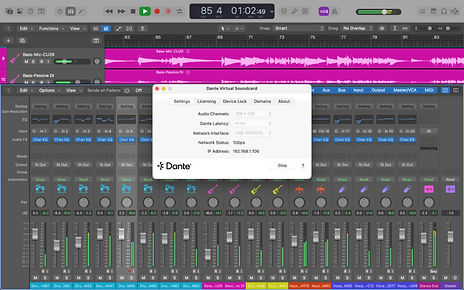
Dante Virtual Soundcard (Paid Software): Dante Virtual Soundcard (DVS) is a software-based tool that transforms a Windows or macOS computer into a fully functional Dante audio endpoint. With it installed, the computer can transmit and receive multiple channels of digital audio through a standard Ethernet connection, eliminating the need for dedicated Dante hardware.
In essence Dante (DVS) acts as a virtual audio interface. Once activated, the computer shows up on the Dante network just like any other Dante device, making it possible to record, play back, or process audio directly over the network using your existing software and workflow. Provides a simple way to integrate a computer into any Dante audio system without extra cabling or interfaces. The Standard Version of (DVS) offering 2x2 up to 64x64 channels at 48kHz or fewer at higher sample rates like 32x32 @ 96kHz and the Pro Version of (DVS) supports 128x128 channels at 48/96kHz. This provides a powerful way to integrate computers into a Dante network for multichannel audio. Channels appear as standard audio drivers (ASIO/WDM on PC, Core Audio on Mac) for use in DAWs, with the number of active flows depending on your setup and sample rate.
Dante Virtual Soundcard Specifications (Standard)
-
Channel Count: Up to 64x64 @ 44.1/48kHz, 32x32 @ 88.2/96kHz, 8x8 @ 176.4/192kHz.
-
Connectivity: Uses standard ASIO/WDM (Windows) or Core Audio (Mac) drivers.
-
Latency: Configurable (4ms, 6ms, 10ms).
-
Key Feature: Turns a computer into a Dante device for simple hardware integration.
Dante Virtual Soundcard Pro Specifications (DVS Pro)
-
Channel Count: Up to 128x128 @ 44.1/48kHz, 128x128 @ 88.2/96kHz, 16x16 @ 176.4/192kHz.
-
Connectivity: Adds Unicast Clocking for reliable software-only synchronization and Virtual Machine support for cloud/virtual environments.
-
Flows: Up to 64 flows for broader device connectivity.
-
Latency: More options: 4ms, 6ms, 10ms, 20ms, or 40ms.
-
Licensing: Flexible, transferable options.
-
Best For: High-channel-count, complex, software-based workflows (live sound, broadcast, virtual soundchecks).
-
Clocking: Capable of being a clock leader and using unicast clocking.
Dante Via (Paid): Dante Via is a cost-effective software application that lets you route audio between applications, devices connected to your computer, and the Dante network. Easily share and receive audio without complex setup all from your desktop.
Note! Dante Via (DV) and Dante Virtual Soundcard (DVS) can only run on a computer separately not at the same time.
Dante Studio (Trial, Paid): Dante Studio is a software package that allows a Windows computer to receive Dante‑based video streams over a standard network connection, eliminating the need for capture cards or other dedicated hardware. Its purpose is to streamline AV‑over‑IP workflows by making them easier to deploy, more adaptable, and cost‑effective. Supports multichannel video, including up to four Dante AV‑H video channels in newer versions of the software.
Dante Video: Dante AV expands the Dante ecosystem by adding network‑based video transport, allowing both video and audio signals to move across the same standard IP network. It provides high‑quality, tightly synchronized video and is designed to be deployed with the same simplicity and familiarity as Dante audio, using existing IT infrastructure.
The platform supports several video formats, including Dante AV Ultra, AV‑H, and AV‑A. Devices using these formats can work together as long as they share the same codec, ensuring broad interoperability across manufacturers. Dante AV also allows users to route video and audio either as a combined stream or as separate, independently managed signals.
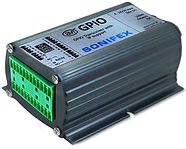
Dante AES70 Control: Dante’s ability to control external devices through RS232, and GPIO (General Purpose I/O) ports gives AV systems a simple way to trigger actions, automate events, and synchronize hardware without needing a full control processor. It’s a small feature with big practical impact, especially in installed sound, paging, and automated venue workflows.
How Dante Uses I/O Ports to Control External Devices:
Many Dante‑enabled devices include GPIO terminals that can send or receive simple control signals. These ports allow Dante to interact with external hardware essentially letting audio events trigger physical actions or letting physical external switches and dry contact relays trigger Dante routing or system behavior.
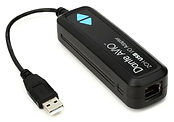
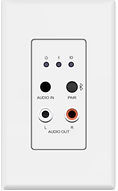
Dante-Audinate Product Line of AVIO Adapters: Portable network audio interfaces that allow legacy audio equipment to join a Dante system. Each adapter provides a specific type of input or output—such as analog audio, USB, or AES3, the standard for sending two channels of digital audio (LPCM) over single cables and translates that signal into Dante audio on the network. They are designed to be affordable, easy to deploy, and reliable for both installed systems and mobile setups. Other types of adapters include Bluetooth, Audio over IP for multichannel listening.
List of Dante Manufacturers & Software Developers, Click Here
Networking Info for Dante Hardware
For Networking IP Information and Hardware, Click Here
Top Rated Managed Switches for Dante Hardware and Digital Audio (AoIP)
⭐ Netgear M4250, M4350 Series, Click Here
Highly recommended by Shure users for Dante and AES67 networks. Purpose‑built AV profiles, easy QoS presets, and rock‑solid multicast handling.
⭐ Cisco SG350 Series
Also reported to work very well for Dante in small/medium networks. Stable firmware, predictable QoS, and widely deployed in enterprise.
⭐ D‑Link DGS‑1210 Series
A cost‑effective option that performs reliably for Dante in smaller isolated networks.
⭐ Luminex GigaCore Series
Mentioned by live‑sound professionals as “foolproof” Dante switches. Designed specifically for AV networks with pre‑tuned profiles.
⭐ Yamaha SWP/SWR Series
Purpose‑built for Dante and used heavily in pro audio installations.
PoE Injectors: Assist in powering Dante devices independently
What they do: Combine Power + Data: They “inject” DC power into the Ethernet line, allowing a single cable to carry both network traffic and electrical power. Injectors only provide power over ethernet when they properly sense P0E specific devices. They use a handshake process defined by IEEE PoE standards to detect whether the device on the other end is PoE‑capable before energizing the line with power + current requirements.
If the device is non‑PoE, the injector leaves the line unpowered, so regular Ethernet devices are safe. Make sure the PoE injector you use has the proper power rating to power your device properly. These devices can be located anywhere from the headend or midspan or at the endpoint, it can be located anywhere along that cable run.
Why Midspans Exist?
Not all switches provide PoE. A midspan solves that by:
-
Injecting 802.3af/at/bt power
-
Allowing you to keep your existing non‑PoE switch
Powering devices like:
-
Dante endpoints
-
IP cameras
-
Wireless access points
-
VoIP phones
-
AV‑over‑IP transmitters/receivers
Professional Audio Hardware Manufactures
-
Allen & Heath
-
Altec Lansing
-
Avid
-
Barix
-
Bose Professional
-
BZBGEAR
-
Electro-voice
-
JBL
-
L-Acoustics
-
Martin Audio
-
QSC Audio
-
Sennheiser
-
Shure
-
Williams AV
-
Yamaha
AVB Audio Video Bridging Networking:
A set of IEEE standards for Ethernet that guarantees low latency, synchronized, and reliable delivery of audio and video streams over Ethernet networks, crucial for professional live sound and broadcast systems.
AVB hardware includes AVB‑compliant switches, endpoints, and interfaces that support precise timing and traffic shaping to ensure reliable media delivery. On the software side, AVB systems use protocols like IEEE 802.1AS for clock synchronization and IEEE 802.1Qav for traffic shaping, allowing devices to coordinate playback with sub‑millisecond accuracy. AVB is especially valuable in professional audio, broadcast, automotive, and industrial environments where deterministic performance and interoperability are critical. Together, AVB hardware and software create a tightly integrated ecosystem for real‑time media transport across standard network infrastructure.
AVB (Audio Video Bridging) hardware includes a range of Ethernet-based devices designed to support synchronized, low-latency media transport across networked environments. Core AVB hardware types include AVB-compliant network switches, which prioritize time-sensitive traffic using protocols like IEEE 802.1Qav and ensure accurate clock distribution via IEEE 802.1AS. AVB endpoints—such as audio interfaces, DSPs, microphones, speakers, and video encoders—are equipped with AVB chipsets or firmware that enable precise media synchronization and seamless interoperability. AVB bridges and gateways allow integration between AVB networks and legacy or non-AVB systems. These hardware components work together to form a deterministic media network ideal for professional AV, automotive infotainment, and industrial control applications where timing accuracy and reliability are critical. AVB was built on the Time‑Sensitive Networking (TSN) foundations.
Pro Audio Manufactures of AVB (Audio Video Bridging) hardware:
-
Meyer Sound – GALAXY processors, loudspeaker systems
-
Biamp – Tesira platform (AVB‑based DSPs, endpoints)
-
PreSonus – StudioLive Series III mixers and stageboxes
-
MOTU – AVB audio interfaces (1248, 16A, 8M, etc.)
-
RME – Digiface AVB
-
Avid – S6L and VENUE systems with AVB support
-
L-Acoustics – LA4X/LA12X controllers (AVB/Milan)
-
d&b audiotechnik – DS100 Soundscape (Milan/AVB)
-
Adamson – Gateway and Milan-ready products
-
DirectOut – EXBOX.MD (Milan/AVB bridge)
Speakers for Outdoor Live Events
Line Array Speakers:
Line arrays are loudspeaker systems designed to deliver clear, even sound coverage over long distances by stacking multiple speaker elements in a vertical column configuration. Each cabinet works together to create a controlled, focused wavefront that reduces volume drop‑off and minimizes unwanted reflections. By adjusting the angle and number of modules, a line array can shape its coverage to match the audience area—whether that’s a narrow throw for a small venue or a long‑throw design for arenas and outdoor events. This approach allows engineers to achieve consistent sound pressure levels from the front row to the back of the space, making line arrays a preferred choice for concerts, theaters, houses of worship, and large public gatherings where uniform audio performance is essential.
Suspending/ Mounting Line Array speakers:
Suspending a line‑array speaker safely and correctly means using the manufacturer’s approved rigging or suspension brackets, hardware specifically engineered to carry the speaker’s weight and maintain the proper angle. These brackets lock into the array’s rigging points and connect to certified load‑rated components like shackles, chains, or truss mounts. When installed properly, the hardware keeps each cabinet aligned, evenly distributes the load, and prevents unwanted movement, ensuring the array hangs securely while delivering consistent coverage across the audience area.
Passive Sub Woofers:
Passive subwoofers play a foundational role in live sound by delivering the deep, powerful low‑frequency energy that full‑range speakers can’t reproduce on their own. In a live environment, they handle the bass and sub‑bass content—kick drums, bass guitars, synths, and the overall low‑end impact that gives a mix weight and physical presence. Because passive subs rely on external amplification and DSP, system designers can match them with the right power, crossover settings, and protection for the venue and application. This flexibility makes them ideal for touring rigs, installed systems, and scalable PA setups where engineers need precise control over tuning and system behavior. When properly deployed and aligned with the main speakers, passive subwoofers help create a balanced, full‑range sound field that maintains clarity, punch, and consistency across the entire audience area.
Why are SpeakON connectors used in Pro audio and what is important about their design: SpeakON connectors provide a secure, high‑current/wattage locking connection for professional loudspeakers, delivering safer, more reliable power transfer than traditional 1/4-inch jacks.
SpeakON connectors are widely used in pro audio, live sound, and studio environments for connecting amplifiers to speakers. They are designed to handle large‑gauge, high‑current speaker cables, typically ranging from 12 AWG to 14 AWG, with some models accommodating 10 AWG depending on the connector series and manufacturer.
Breakdown:
-
NL2 / NL4 (standard Speakon): Commonly supports 12–14 AWG.
-
NL4FX / premium variants: Often support up to 10 AWG.
-
NL8 (8‑pole): Usually supports 12 AWG, sometimes 10 AWG depending on the strain‑relief insert.
“Perfecting Every Detail of the Listening Experience.”
Area Audible Acoustics: Direct Sound vs. Reflected Sound
Direct sound travels straight from your speakers to your ears, carrying the purest audio signal. Reflected sound bounces off walls, floors, ceilings, and furniture before reaching you.
-
Early reflections (those arriving within 20ms of the direct sound) can blur imaging and collapse the soundstage.
-
Late reflections add reverberation, which may be desirable in moderation but can muddy detail when excessive.
EN 54‑24 standard, what is it: Originates from Europe. More specifically, it is part of the EN 54 series, which is a set of European Norms (EN) developed by CEN — the European Committee for Standardization.
EN 54‑24 defines the performance and construction criteria for loudspeakers used in emergency voice‑alarm systems. Its purpose is to ensure that these speakers deliver clear, intelligible announcements during fire or life‑safety events. As part of the broader EN 54 family of fire detection and alarm standards, it helps guarantee that voice‑alarm components meet consistent, reliable benchmarks for use in critical emergency situations.
Indoor - Outdoor Pro-Audio Audio Best Practices
1. Indoor Audio Best Practices
Room Acoustics:
-
Evaluate reflections, reverberation, and standing waves
-
Use acoustic treatment (panels, bass traps, diffusers) to improve clarity
-
Position speakers to minimize boundary interference
Speaker Placement & Coverage:
-
Aim for even SPL across the listening area
-
Avoid placing speakers too close to walls or corners
-
Use delay speakers for long rooms to maintain intelligibility
2. Outdoor Audio Best Practices
1. Environmental Assessment:
-
Analyze terrain, coverage zones, and reflective surfaces
-
Account for wind, humidity, and temperature shifts
-
Identify noise sources (traffic, HVAC, crowd bleed)
2. Speaker Selection & Placement:
-
Use weather-resistant enclosures (IP-rated)
-
Prioritize long-throw horns, line arrays, or column arrays for distance
-
Avoid ground reflections and phase cancellation by elevating speakers
-
Use delay speakers for time-aligned coverage in deep zones
3. Power & Cabling:
-
Use outdoor-rated speaker cable (UV, moisture, abrasion resistant)
-
Terminate with locking connectors (SpeakON, XLR)
-
Protect power runs with conduit or cable ramps
-
Isolate audio and power paths to reduce interference
4. Amplification & DSP:
-
Match amplifier output to speaker loads and cable length
-
Use DSP for EQ, delay, limiting, and zone control, independently manage coverage areas (main field, VIP, stage front, overflow zones).
-
Apply high-pass filters to reduce rumble and wind noise
-
Implement gain structure to prevent clipping and distortion
5. Weatherproofing & Safety:
-
Use enclosures, covers, or racks for amps and processors
-
Elevate gear off ground to avoid water damage
-
Secure stands and trusses against wind
-
Comply with local electrical and safety codes
6. System Tuning & Testing:
-
Perform SPL mapping and coverage verification
-
Use RTA (Real-Time Analyzer) and measurement mics to tune EQ for clarity, balance, and consistency across the listening areas.
-
Test for phase coherence and intelligibility
-
Validate wireless mic and IEM performance in open air. IEM (In‑Ear Monitor) is a personal monitoring system used by performers, presenters, musicians, or technicians to hear a custom audio mix through wireless bodypack receivers and in‑ear earpieces.
7. Operational Best Practices
-
Train staff on signal flow and emergency shutdown
-
Label zones and cable paths clearly
-
Monitor system health with remote apps or telemetry
-
Document settings and presets for repeatability
IEM (In‑Ear Monitor)
Key Features of In‑Ear Monitors (IEMs):
Personalized Monitoring
Each performer gets a dedicated mix tailored to what they need to hear, without altering the front‑of‑house sound.
Superior Noise Isolation
The sealed earpieces block out stage volume, reducing bleed, feedback risk, and overall monitoring chaos.
Hearing Protection
By lowering the need for loud floor wedges, IEMs help protect performers from excessive SPL and long‑term hearing fatigue.
High‑Fidelity Audio
Professional IEMs often use multiple balanced‑armature or dynamic drivers with internal crossovers, delivering detailed, accurate, and well‑balanced sound.
Comfort & Secure Fit
Many systems offer custom‑molded earpieces that stay in place and remain comfortable during long rehearsals and performances.
If you want, I can also rewrite the entire wireless/IEM section, so it reads like a polished, unified part of your Outdoor Pro‑Audio guide.

Bose Hardware Reference Design Schematic for
Indoor/Outdoor Stage Venu
with Live Dante Audio Video Streaming
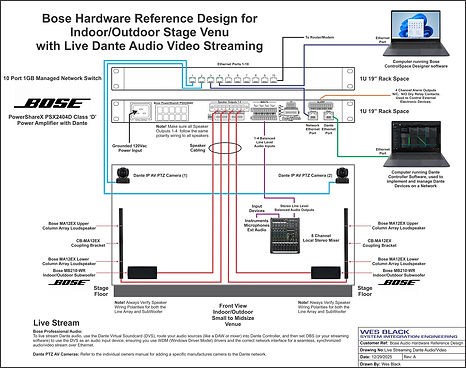
Drawing by: Wes Black. To View the PDF file: Click Here

Stand alone PoE Injectors for Dante

ASIO, short for Audio Stream Input/Output, is a driver protocol created by Steinberg to give audio software a direct, high‑performance path to sound hardware. By bypassing the normal Windows audio layers, ASIO delivers extremely low latency and precise timing, which is why it’s widely used in professional recording, live monitoring, and music production. It supports high‑bandwidth audio transfer and tight synchronization, allowing engineers and musicians to capture and play back sound with the accuracy required for studio‑grade work.
Cable & Connector Information
Analog/Digital Shielded Audio Cable
AES/EBU
Fiber Optic Cable
Optical/Toslink
Pro Audio Testing Hardware
Digital SPL Audio Meter
A digital SPL (Sound Pressure Level) meter measures how loud audio is in a space, expressed in decibels (dB). In AV, pro‑audio, and residential environments, it’s an essential tool for calibration, safety, consistency, and system performance.
Professional Audio & Live Sound
A:) In pro‑audio environments, SPL meters are critical for:
Front‑of‑house (FOH) tuning
Engineers use SPL meters to:
-
Set reference levels
-
Maintain consistent show volume
-
Protect audience hearing
B:) System alignment
Meters help align:
-
Line arrays
-
Subwoofer levels
-
Delay towers
-
Fill speakers
C:) Regulatory compliance
Concerts and venues often have strict SPL caps (A‑weighted, slow/fast response). Meters provide real‑time monitoring.
Commercial Audio
Commercial audio refers to professional-grade sound systems engineered for public and corporate environments, delivering clear, consistent music, announcements, and audio reinforcement in spaces such as retail stores, restaurants, conference centers, warehouses and stadiums.
-
System design must account for room acoustics, coverage patterns, and zoning to ensure even sound distribution.
-
Components typically include ceiling or wall-mounted speakers, amplifiers, mixers, and paging microphones.
-
Integration with control interfaces and network protocols allows centralized management and automated scheduling.
-
Reliability and ease of maintenance are critical for 24/7 operation in commercial settings.
-
Speakers and audio distribution hardware can consist of 4-8 ohms/ 70V/100V amplifiers and other related interface hardware.
Why do Commercial Audio Systems use 70V and 100V Amplifiers and Speaker Systems
Commercial audio systems often use 70V and 100V constant-voltage distribution to make long cable runs and multi-speaker setups simple and efficient over a single cable run. By stepping up the amplifier’s output voltage with line-matching transformers, current on the speaker lines stays low. This lets you use smaller, less expensive cabling and keeps line losses to a minimum even over hundreds of feet.
Each speaker has its own transformer with different wattage taps that connect into the same high-voltage line through its own transformer, allowing dozens or even hundreds of speakers to share one amplifier without complex impedance calculations. In the U.S., the 70 V standard (actually 70.7 V RMS, 100 V peak) and was chosen to stay just under electrical-code voltage thresholds and avoid extra conduit requirements. Internationally, a 100 V nominal line is common, delivering the same benefits across global installations.
Mitigating Frequency Loss
-
Use high-quality 70V/100V Speaker Line Matching Transformers that are in line with the wattage requirements for your design with wide frequency bandwidth specs.
-
Choose speakers designed for music playback, not just paging.
-
Ensure proper system design and calibration, especially for distributed audio setups.
Causes of Frequency Response Loss in 70V/100V Audio Systems
-
(Transformer Saturation at Low Frequencies): Transformers used in 70V/100V systems can saturate more easily at low frequencies, which leads to diminished bass performance. This is especially noticeable with cheaper or poorly designed transformers.
-
(Insertion Loss ): Low-cost transformers introduce insertion loss, which can affect the overall frequency response of the system. While this trade-off allows for simpler wiring and smaller gauge cables, it can compromise audio fidelity.
-
(Transformer Bandwidth Limitations): Transformers have inherent bandwidth limitations. High-quality models can handle a wider frequency range, but budget options may roll off both low and high frequencies, reducing clarity and depth.
-
(Wire and Transformer Losses): Combined Even though 70V/100V systems reduce wire loss by allowing longer cable runs with smaller gauge wire, the transformer itself introduces its own losses. These combined losses can subtly degrade the audio signal.
70V/100V Indoor/Outdoor Attenuators
70V/100V Attenuators are used primarily for local single zone or multiple zone locations to manually adjust for proper signal levels for proper audio settings in different environments or specific locations that require different SPL levels. Also some installations require individual controls that need to be easily accessible by users to increase or decrease or even mute audio in specific area's when needed. When specifying and using these attenuators, they should be selected for the proper wattage rating related to the power being driven from the source amplifier to prevent hardware failures.
Outdoor Audio, Speakers, Amplfiers, Cabling
Outdoor audio is essential for personal use, events and entertaining outdoors. Whether it is a simple patio setup or large back yard with lots of space, seating areas and a barbeque and swimming pool area, audio performance is essential for good sound reproduction. Several design considerations need to be considered and implemented.
In commercial audio, the amplifier 80/20 rule is a practical guideline for sizing 70‑volt and 100‑volt amplifier systems. It means you should design the total connected speaker load to use no more than about 80% of the amplifier’s rated power, leaving roughly 20% as headroom. This margin protects the amp from clipping, accommodates transformer tolerances, and ensures stable performance when multiple speakers, long cable runs, or paging peaks demand extra power. By following the 80/20 rule, designers create reliable, distortion‑free distributed audio systems that remain safe and efficient under real‑world operating conditions.
Design
Is the installation new or a retrofit? Each design requires different strategies and installation processes from start to finish. How far are the amplifier/amplifiers from the speakers, in some cases if the amplifiers are more than 200ft away, it's better to locate the amplifier/amplifiers closer to the speakers and have the source audio signals be further away. You could use a 70V/100V system for longer distances, but the audio quality would suffer.
-
Weatherproofing & Durability: Use speakers and equipment rated for outdoor use IP (Ingress Protection) rated products and enclosures.
-
Cabling Infrastructure: Use direct-burial or conduit-protected cabling to prevent damage from landscaping or foot traffic.
-
Speaker Placement & Coverage: Avoid “hot spots” or dead zones by considering dispersion angles and distances.
-
Scalability & Flexibility: Design with future expansion in mind (additional zones, upgraded sources). Consider wired vs. wireless options depending on project size and layout.
Speaker Designs for Indoor & Outdoor Applications
Speaker selection is one of the most critical decisions in any AV system design. Indoor and outdoor environments impose very different acoustic, environmental, and coverage challenges, so the speaker types used in each space must be engineered to match those conditions. Below is a detailed breakdown of the most common speaker designs, why they exist, and where they excel.
🏠 Indoor Speaker Designs
Indoor environments benefit from controlled acoustics, stable temperatures, and predictable room geometry. Speaker designs focus on coverage consistency, aesthetics, and speech intelligibility.
1. Ceiling Speakers
-
Ideal for offices, conference rooms, retail, and hospitality
-
Provide wide dispersion for even background music and paging
-
Flush‑mounted for clean aesthetics
-
Available in low‑impedance and 70V/100V versions
-
Variants include coaxial, back‑can, and fire-rated models
2. Wall‑Mounted Surface Speakers
-
Used when ceiling access is limited or directional sound is needed
-
Provide better projection toward listeners
-
Common in classrooms, meeting rooms, and corridors
-
Available in compact, full‑range, and subwoofer formats
3. Pendant Speakers
-
Designed for open‑ceiling or industrial spaces
-
Provide wide coverage from high mounting points
-
Blend into architectural lighting fixtures
-
Excellent for retail, restaurants, and modern office designs
4. Column / Line‑Array Speakers
-
Narrow vertical dispersion for high speech intelligibility
-
Reduce reflections in reverberant spaces
-
Ideal for lecture halls, houses of worship, and large meeting rooms
-
Can be passive, active, or digitally steerable
5. In‑Wall Speakers
-
Used in high‑end boardrooms and architectural spaces
-
Provide clean aesthetics with minimal visual impact
-
Often paired with subwoofers for full‑range performance
Indoor - Outdoor Commercial Audio Best Practices


14/4 16 AWG Cable
Cable Info
Choosing the right American Wire Gauge (AWG) ensures minimal signal loss, preserves audio clarity, and prevents amplifier strain. Thicker wires (lower AWG numbers) have lower resistance, which is critical when running cable long distances or powering multiple zones simultaneously.
Recommended Gauge vs. Maximum Run (8 Ω Speakers)

Why Wire Gauge is Important!
Speaker Cable Material & Installation Considerations
(Data for 8 Ω speakers; halve these lengths for 4 Ω models)
If any zone runs over 50 ft or drives a low-impedance (4 Ω) speaker load, bump up two AWG sizes (e.g., from 16 AWG to 14 AWG) to keep power loss under 5% of speaker impedance. This headroom ensures each zone plays at full fidelity, even under peak loads.
Direct Burial Cable
Note: For outdoor wiring in the ground, use direct burial cable or install schedule 40 for better protection from the elements when buried in the ground.
-
Oxygen-free copper (OFC) offers the best conductivity and longevity; copper-clad aluminum (CCA) can be used when budget is tight but requires thicker gauge to match performance.
-
Always choose CL2/CL3-rated cable for in-wall or ceiling installations to meet fire-safety codes and maintain audio quality.
-
Use Stranded conductor cables, they are more flexible and easier to terminate than solid core cables and are not ideal for tight attic or wall runs.

Commercial Audio Hardware Manufactures
-
Audio Control: (Commercial & Residential Multizone Audio Amplifies)
-
Autonomic: (Home and Commercial Multizone Audio Hardware and Music Streaming Systems)
-
Blaze-Audio: (Amplifiers, Loudspeakers, Controllers, and Software)
-
Bluesound: (Wired, Wireless Speakers)
-
Bogen: Amplifiers, Speakers, Microphones, VoIP Technologies, Telephone Paging
-
Bose Professional: Wired/Wireless products, both Home and Professional
-
DAD Digital Audio Denmark: Professional Audio Products
-
Juke Audio: (Multi-room Amplifiers with Wireless Streaming Capabilities)
-
Lea Professional: (Home & Commercial Pro Audio Amplifiers and IoT Technologies)
-
Origin Acoustics: Speakers, Soundbars, Powered Subwoofers, Amplifiers
-
OSD Audio: (Commercial & Residential Amplifiers, Speakers, Subwoofers)
-
Parasound: (Home & Commercial Pro Audio Pre-Amplifiers and Amplifiers)
-
Pyle: (Wired & Wireless Amplifiers & Speakers)
-
QSC: (Amplifiers, Speakers, Subwoofers, Software)
-
Russound: (Amplifiers, Wired Connectivity, Wireless Control Software)
-
Savliiq: (Amplifiers, Speakers, Subwoofers, Software)
-
Sonos: (Wired, Wireless Speakers & Amplifiers)
-
Sonance: (Speakers & Amplifiers)
-
Triad: (Speakers, Soundbars & Amplifiers)
Indoor - Outdoor Commercial Audio Best Practices
Audio Testing & Installation Hardware
Commercial Audio Testing Hardware
Digital SPL Audio Meter
A digital SPL (Sound Pressure Level) meter measures how loud audio is in a space, expressed in decibels (dB). In AV, pro‑audio, and residential environments, it’s an essential tool for calibration, safety, consistency, and system performance.
Commercial Audio Installations
A.) Digital SPL meters are used to:
Set consistent volume levels across zones.
Restaurants, retail, offices, and hospitality spaces require:
-
Even coverage
-
Comfortable listening levels
-
Compliance with brand standards
An SPL meter ensures each zone matches the design spec.
Meet safety and code requirements
B.) Many commercial environments must stay below:
-
OSHA limits
-
Local noise ordinances
-
Venue‑specific SPL caps
Meters verify compliance.
C.) Tune distributed audio systems
For 70V/100V systems, SPL meters help:
-
Balance ceiling speakers
-
Match paging vs. background music levels
-
Avoid hot spots and dead zones
D.) Commission AV systems accurately
During commissioning, SPL meters validate:
-
DSP output levels
-
Amplifier gain structure
-
Room EQ targets


Dante AES67 Audio and AES70 GPIO Control-Monitoring Hardware

Dante Interface Card

Dante, (AVB) Audio Video Bridge Hardware

Dante Pro/Commercial Audio Paging Mic
Dante Multizone
Music & Paging System
Reference Design Schematic

Drawing by: Wes Black. To View the PDF file: Click Here
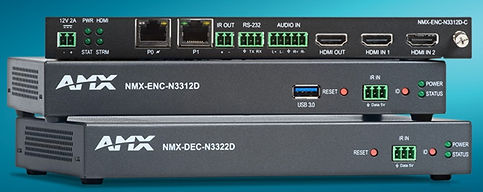
Dante AV-H
Encoders & Decoder
Endpoints

Dante Controller Software Screnshot GUI
Dante Virtual Soundcard Software Screenshot GUI

Dante ControlSpace Designer Screenshot GUI

Dante Studio
Screenshot GUI

Dante AVIO 2 Channel Analog Audio Input/Output Adapters
Dante AVIO USB Type 'A' Adapter
Dante AVIO (GPIO)
General Purpose Input/Output Module

Dante AVIO Bluetooth Adapter
Dante AVIO Audio/Bluetooth Single Gang Wall Plate

Dante AVIO Single Gang Decora Style Inline Audio Volume Control
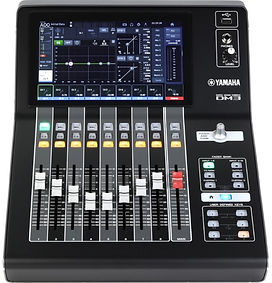
Dante Audio Mixer

(AVB) Audio Bridge


Line Array Speakers

Live Stage with
Vertical Line Array Speakers
Single-point Suspension Bracket
Passive Sub Woofer

SpeakON Connectors

Line Array Speakers
with Subwoofer

DSP Audio Processors

32 Band Stereo Graphic EQ

IEM (In‑Ear Monitor) Monitoring System


Digital Audio SPL Meter

Commercial Audio Hardware

Commercial Audio Hardware Warehouse Paging
Ref: 70V Audio Distribution Diagram Proof of Concept Diagram.
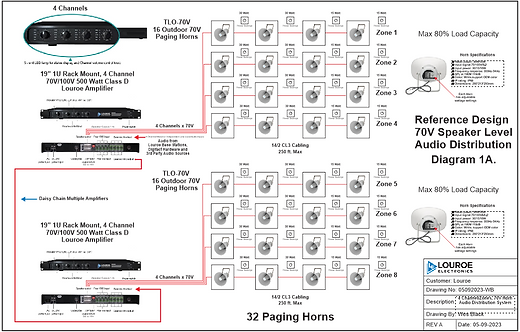
70V Reference design with Class 'D' Amplifers and Paging Horns. Click Here to open the PDF document.

Surface Mount Speaker with Adjustable 70V, 8 ohm Settings


In Ceiling 70V Speakers with
8 Ohm and Multiple 70V Cable Taps

Indoor 70V/100V
Inwall Attenuator
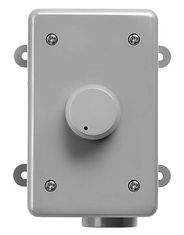
Outdoor 70V/100V
Surface Mount Attenuator

SIP Audio IP 2-Way
Interface Hardware
Line Array Speakers with Subwoofer

SIP Indoor/Outdoor
IP Speakers
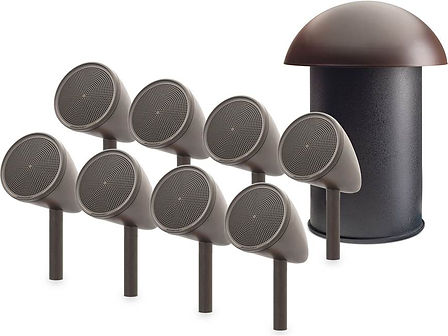
Weatherproof Outdoor Landscaping Speakers

Weatherproof Outdoor Patio Speakers

Indoor/Outdoor
Paging Horn
Digital Audio SPL Meter
